Networking Insights
The networking dashboard in Chop Insights allows you to monitor the performance and data usage of your Mince-specific remote events and functions.
Roblox’s engine has a hard data limit of 50 KB/s (Kilobytes per second) for all remote traffic. You should aim to stay well under this limit to allow Roblox’s own replication systems (like character movement and physics) to operate smoothly.
The main data rate you see on the Insights dashboard represents only the traffic generated by the Mince framework, not the entire game’s network usage.
KB/s vs. kbps: What’s the difference? A “KB” is a Kilobyte, while a “kb” is a kilobit. There are 8 bits in 1 Byte. This means Roblox’s 50 KB/s limit is equivalent to 400 kbps. It’s a common point of confusion, but network traffic on Roblox is almost always discussed in Kilobytes per second (KB/s).
Performance Philosophy
Mince deliberately does not include features like buffer-based compression for its networking APIs. This is a core design choice based on a simple philosophy: if your game’s remote traffic is consistently exceeding 25 KB/s, there is likely a systemic architectural problem that should be addressed directly, rather than being masked by compression.
Adding compression introduces its own overhead:
- CPU Cost: Encoding and decoding data can be computationally expensive.
- Development Overhead: Requiring developers to define schemas for data adds a painful and rigid layer to the development process.
Data Accuracy
The KB/s and data size statistics shown in Insights are estimations.
Because Roblox does not provide a native way to measure the exact in-memory size of data being sent over the network, the size of said data is estimated based on a number of factors. While this provides a very useful baseline for comparison and optimization, the numbers may not be 100% accurate to the actual data sent over the wire.
Analysis Features
Insights provides several tools to help you analyze your remote traffic:
- Noisiest Remotes: This view identifies the remotes that are being called most frequently, helping you spot spammy or inefficient communication patterns.
- Heaviest Remotes: This view identifies the remotes that are sending and receiving the largest data payloads (based on estimated size), helping you find opportunities to reduce the amount of data being sent.
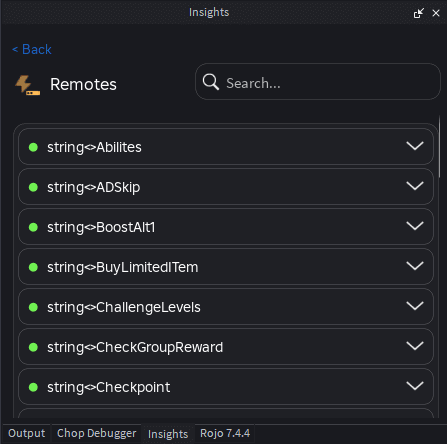
- Remote Browser: You can also browse a complete list of all remote events and functions created by Mince to get a full overview of your networking landscape.