Custom Function Tracking
Beyond the automatic monitoring of the Mince framework, Chop Insights allows you to track the performance of specific, critical functions in your own code. This is done using the ---/ChopTrack comment directive.
How to Track a Function
To track a function, place the ---/ChopTrack directive on the line sharing its definition.
There is one critical rule: the function must be part of the table that is returned by a Mince-managed module. Chop needs to be able to uniquely identify and wrap the function, which it does by associating it with the module it belongs to.
Correct Usage
-- This function will be tracked by Insights
local SomeModule = {}

function SomeModule:DoThing() ---/ChopTrack
    -- Your code here
end

return SomeModule
Incorrect Usage
The directive will be ignored in the following scenarios because the function is not part of the final returned module table.
-- Incorrect: Function is on a local table, not the returned module
local SomeModule = {}
local OtherTable = {}

function OtherTable:DoThing() ---/ChopTrack
    -- This will NOT be tracked
end

return SomeModule
-- Incorrect: Function is a local variable
local function DoThing() ---/ChopTrack
-- This will NOT be tracked
end
return {}Collected Statistics
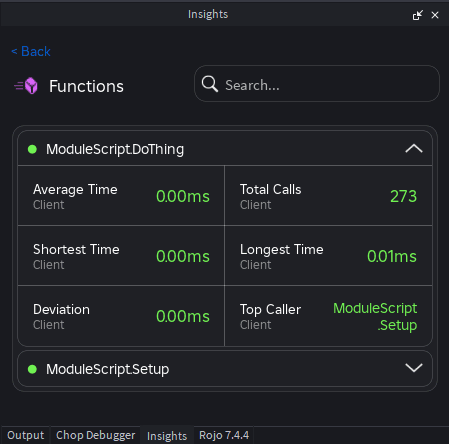
After running a playtest session with tracked functions, the Insights dashboard will display the following performance statistics for each one:
- Average Time: The average execution time of the function, typically in milliseconds.
- Total Calls: The total number of times the function was called during the playtest session.
- Shortest Time: The fastest single execution time recorded for the function.
- Longest Time: The slowest single execution time recorded. This is very useful for spotting performance spikes or inconsistent behavior.
- Deviation (Standard Deviation): This measures how much the function’s execution time varies from the average. A low standard deviation means the function’s performance is very consistent, while a high deviation indicates it can have unpredictable performance spikes.
- Top Caller: The script and function that called this tracked function most frequently, helping you identify “hot paths” in your code.